

Download Bible Pro – Bible Study, Scripture Reading, Christian Tools
Overview
Bible Pro es una herramienta de productividad dedicada diseñada para llevar la Biblia directamente a los ordenadores personales de los usuarios, ofreciendo una plataforma digital para la lectura, estudio y reflexión de las Escrituras. Adaptada para estudiantes, ministros, profesores y personas que buscan un compromiso más profundo con los textos religiosos, la aplicación funciona como un compañero bíblico portátil y accesible. Su propósito principal es simplificar el acceso a las Escrituras mientras proporciona herramientas complementarias para mejorar la comprensión y la retención. Al permitir a los usuarios llevar toda la Biblia en formato digital, Bible Pro aborda desafíos comunes como las limitaciones de los libros físicos, la falta de referencias cruzadas y la dificultad para organizar notas o compartir contenido.
La aplicación es particularmente valiosa en contextos académicos, pastorales y devocionales personales donde el compromiso constante con las Escrituras es esencial. Apoya el estudio estructurado al permitir a los usuarios resaltar pasajes, tomar notas y exportar contenido para uso sin conexión. El desarrollador, Bible Pro, ha posicionado la aplicación como un recurso gratuito con expansiones premium opcionales, haciéndola accesible a una amplia audiencia. Aunque el desarrollador no proporcionó detalles técnicos adicionales sobre el equipo de desarrollo o el trasfondo organizativo, el enfoque de la aplicación en usabilidad y funcionalidad sugiere un enfoque dirigido a servir a las comunidades cristianas. Los casos de uso del mundo real incluyen la preparación de sermones, la enseñanza en el aula, devociones diarias y estudios bíblicos en grupo.
Key Features & Functionality
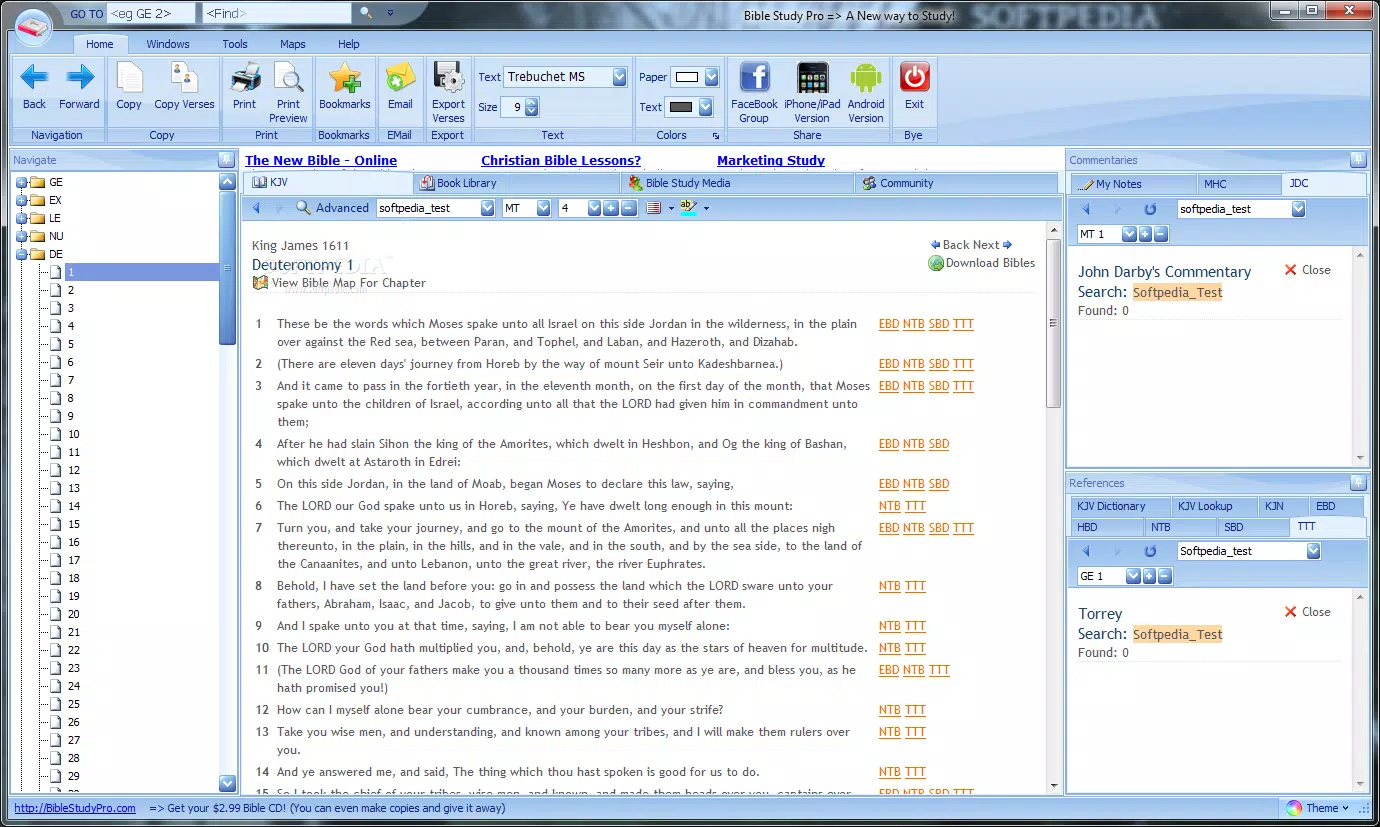
- Clean and User-Friendly Interface – The application features a minimalist layout with customizable visibility options, allowing users to toggle interface elements on or off. This ensures an uncluttered reading experience, ideal for focused study or meditation.
- Export and Sharing Options – Users can export Bible chapters in multiple formats including Word documents, PDFs, and HTML files. This functionality supports seamless sharing with others, integration into presentations, or inclusion in personal study materials.
- Audio Playback Integration – Bible Pro enables users to listen to scripture passages by redirecting them to external websites that host audio content in Flash or Real Audio formats. This feature supports auditory learning and spiritual reflection.
- Integrated Note-Taking Utility – A built-in tool allows users to record personal insights, reflections, and study notes directly within the application. These notes are stored alongside specific passages for easy reference.
- Expandable Feature Set – While the base application is free, users can enhance their experience by purchasing additional resources such as Bible maps and expanded book libraries, offering deeper contextual understanding.
- Help and Support System – A drop-down Help menu provides access to the official website, instructional videos, and a screenshot capture tool for reporting issues to the developers.
These features collectively support a multi-modal approach to Bible engagement—reading, writing, listening, and sharing—making the app suitable for both casual readers and serious scholars.
Interface, UX & Performance
Bible Pro presents a clean, intuitive interface designed for ease of navigation and minimal distraction. The layout emphasizes readability, with clear typography and logical placement of core functions. Users can customize the display by hiding non-essential elements, which enhances focus during study sessions. Navigation is straightforward, with menu options that allow quick access to scripture, notes, and export tools.
Although the developer did not list formal performance metrics, the application’s lightweight file size of 12.4 MB suggests efficient resource usage. The app is expected to run smoothly on standard Windows systems, though specific requirements were not disclosed. Responsiveness appears consistent across different screen sizes, supporting both desktop and laptop use. Stability is implied through the inclusion of a comprehensive help system and user support tools, indicating attention to user experience. However, performance on older or low-end devices has not been verified, and no information was provided about update frequency or crash reports.
Platform Compatibility & Technical Requirements
Bible Pro is available exclusively for the Windows operating system. The current version is 1.0, with a file size of 12.4 MB. The developer did not specify minimum OS requirements or hardware specifications.
Compatibility with older Windows versions, such as Windows 7 or 8, has not been confirmed. Users should verify system compatibility before installation. The app is distributed as a free download, with no in-app purchases or subscription models mentioned.
While the application is designed for desktop use, there is no indication of mobile or web-based versions at this time.
Pros and Cons
Pros
- Free to download and use, making it accessible to a wide audience.
- Minimal interface with customizable visibility for distraction-free study.
- Supports multiple export formats for sharing and offline use.
- Includes built-in note-taking for personal reflection and study.
- Offers audio playback via external links, supporting auditory learners.
- Provides expandable features through optional add-ons.
- Includes a structured help system with video tutorials and support tools.
Cons
- Audio playback requires external websites, which may limit accessibility.
- No official mobile or web version available.
- Specific system requirements were not listed.
- Export and sharing features rely on third-party formats, which may affect compatibility.
- Dependency on external audio platforms may result in outdated or unavailable content.
- No information on update frequency or long-term support.
FAQ
Is Bible Pro available for mobile devices?
As of now, Bible Pro is only available for Windows desktop systems. There is no official mobile version for Android or iOS.
Can I use Bible Pro without an internet connection?
Yes, the core Bible text and local features such as reading and note-taking can be used offline. However, audio playback requires access to external websites, which may require an internet connection.
Are there any hidden costs in Bible Pro?
The base application is completely free. Additional features like maps and book libraries are available for purchase, but these are optional and not required to use the core functionality.
How do I get help if I encounter a problem?
Bible Pro includes a Help menu with links to the official website, instructional videos, and a screenshot tool to assist in reporting issues to the developers.
Is Bible Pro safe to download?
Yes, the application is distributed as a free download with no known malware or security risks. It is recommended to download only from official or trusted sources.
Final Thoughts + CTA
Bible Pro stands out as a thoughtful, no-frills tool for anyone committed to regular scripture engagement. Its clean interface, export capabilities, and support for audio and note-taking make it a practical companion for students, educators, and faith-based professionals. While it lacks mobile availability and relies on external platforms for audio, its core functionality is robust and well-organized.
The free model with optional upgrades ensures broad accessibility without compromising quality. For those seeking a reliable, lightweight Bible study tool on Windows, Bible Pro delivers clear value. Its emphasis on simplicity, customization, and user support reflects a strong understanding of real-world study needs.
Download Bible Pro now


